MT-Workflow: Native Odoo Approval Workflows with Visual BPMN Control
MT-Workflow is an advanced approval and workflow framework built for Odoo. It is not a separate OA system, and it is not just a diagramming tool. Its purpose is to place configurable approval control directly around real Odoo business documents, native buttons, users, employees, departments, job positions, notifications, and workflow history.
In many companies, approval is not a standalone action. A sales order may need management review before it is sent. A high-value order may need finance review before confirmation. A contract may require legal input before the business team can continue. The real requirement is not simply to collect an approval decision, but to decide when the original Odoo business action is allowed to run.
MT-Workflow addresses this by turning approval into a native workflow control layer inside Odoo.
Built Around Native Odoo Buttons
One of the most important design choices in MT-Workflow is that it binds workflows to existing Odoo buttons instead of forcing users into a separate approval entry point.
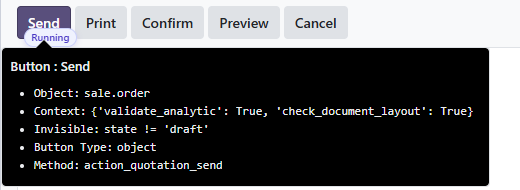
For example, a workflow can control the "Send" or "Confirm" button on a sales order, the "Confirm Order" button on a purchase order, or an object button on another Odoo model. When a user clicks the original button, MT-Workflow checks whether approval is required before the business method continues.
If approval is not required, the original Odoo action runs normally. If approval is required, the workflow starts first. After the approval path is completed, the original action can either be retried manually by the user or executed automatically by the system, depending on the workflow configuration.
Administrators can identify the real Odoo method behind a button in debug mode. This makes the workflow binding explicit and traceable.
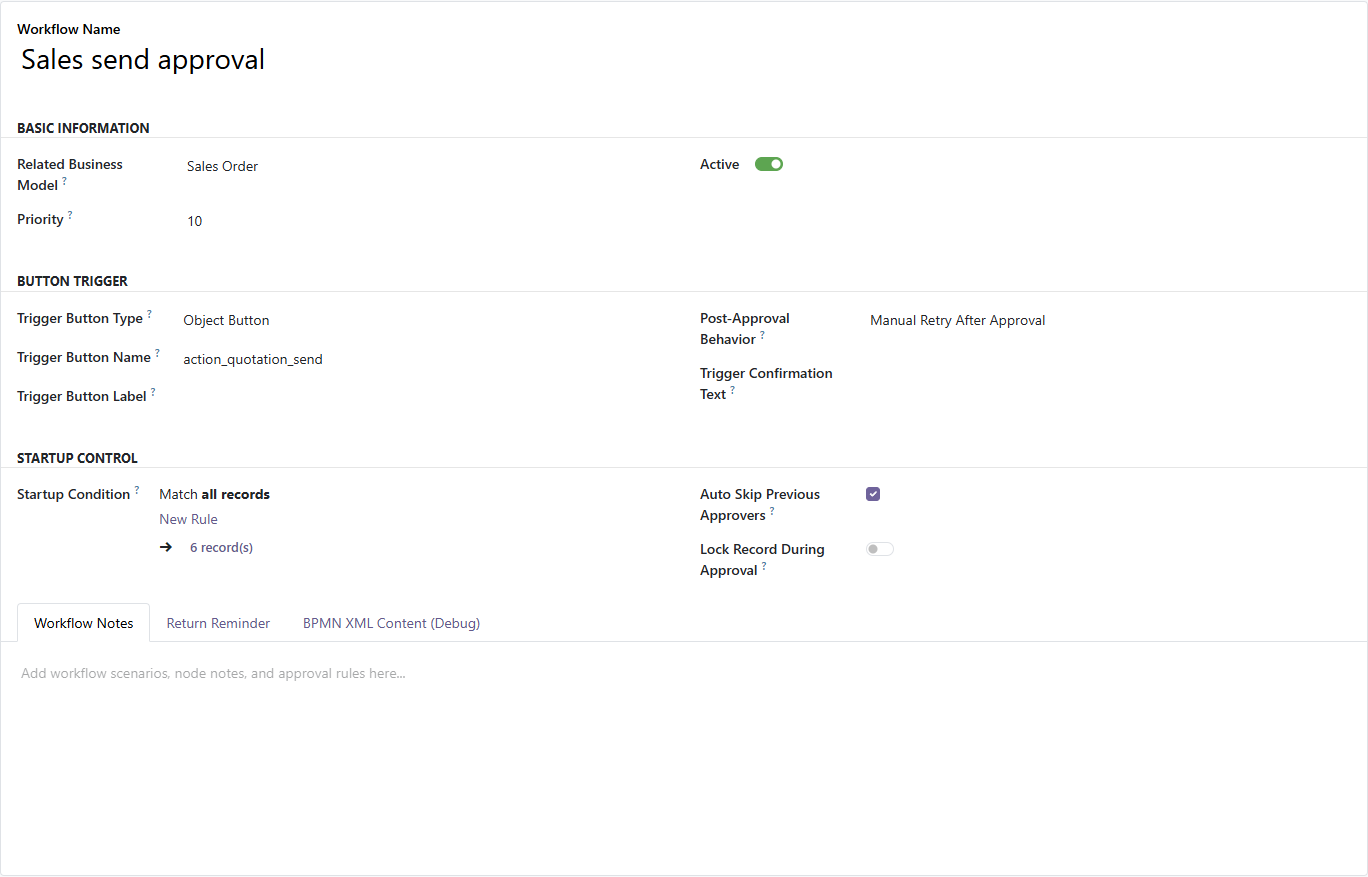
The workflow definition stores the related business model, trigger button type, trigger button name, start condition, priority, enabled status, and the behavior after approval. This keeps approval logic connected to the actual business object rather than separated into an unrelated request form.
Workflow Definitions for Real Business Scenarios
A workflow definition should represent one clear business scenario. Common examples include sales order approval, purchase order approval, high-value quotation review, payment review, contract review, or other approval gates before a native Odoo action can continue.
Start conditions use Odoo domain expressions, so the same model and button can support different approval paths. For example, a company can create one workflow for normal sales orders and another workflow for orders above a defined amount. Priority then determines which matching workflow should be selected first.
This approach gives implementation teams a clean way to model real business rules without hard-coding every approval path.
Visual BPMN Design Instead of Hard-Coded Approval Chains
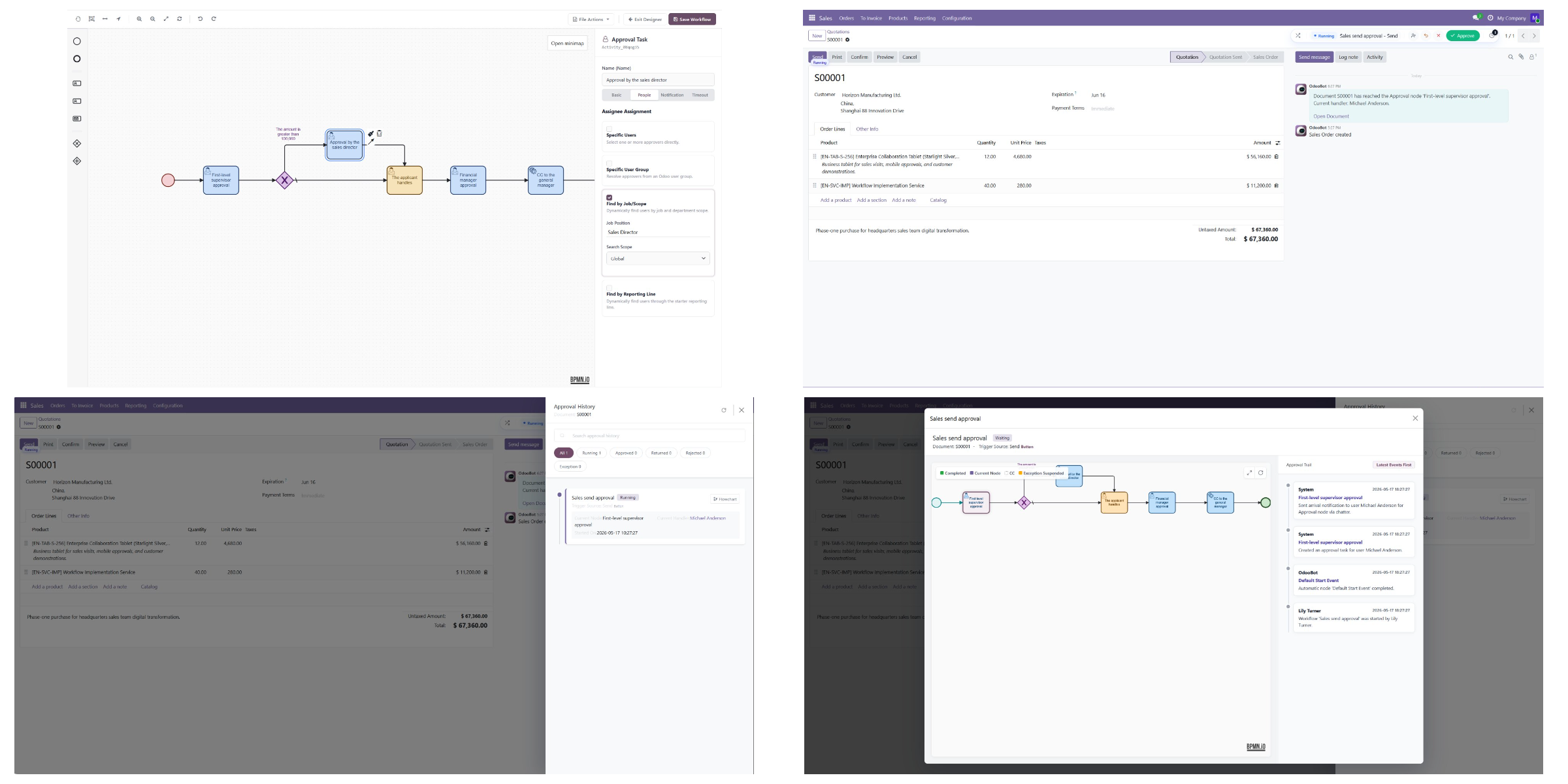
MT-Workflow includes a BPMN-based visual designer. Administrators and consultants can design workflow paths with nodes, connections, branch rules, and node properties.
The designer is especially useful when approval logic is more complex than a single manager review. It supports approval tasks, handling tasks, CC tasks, exclusive branches, parallel branches, assignee rules, notifications, reminders, and timeout settings.
Approval Nodes
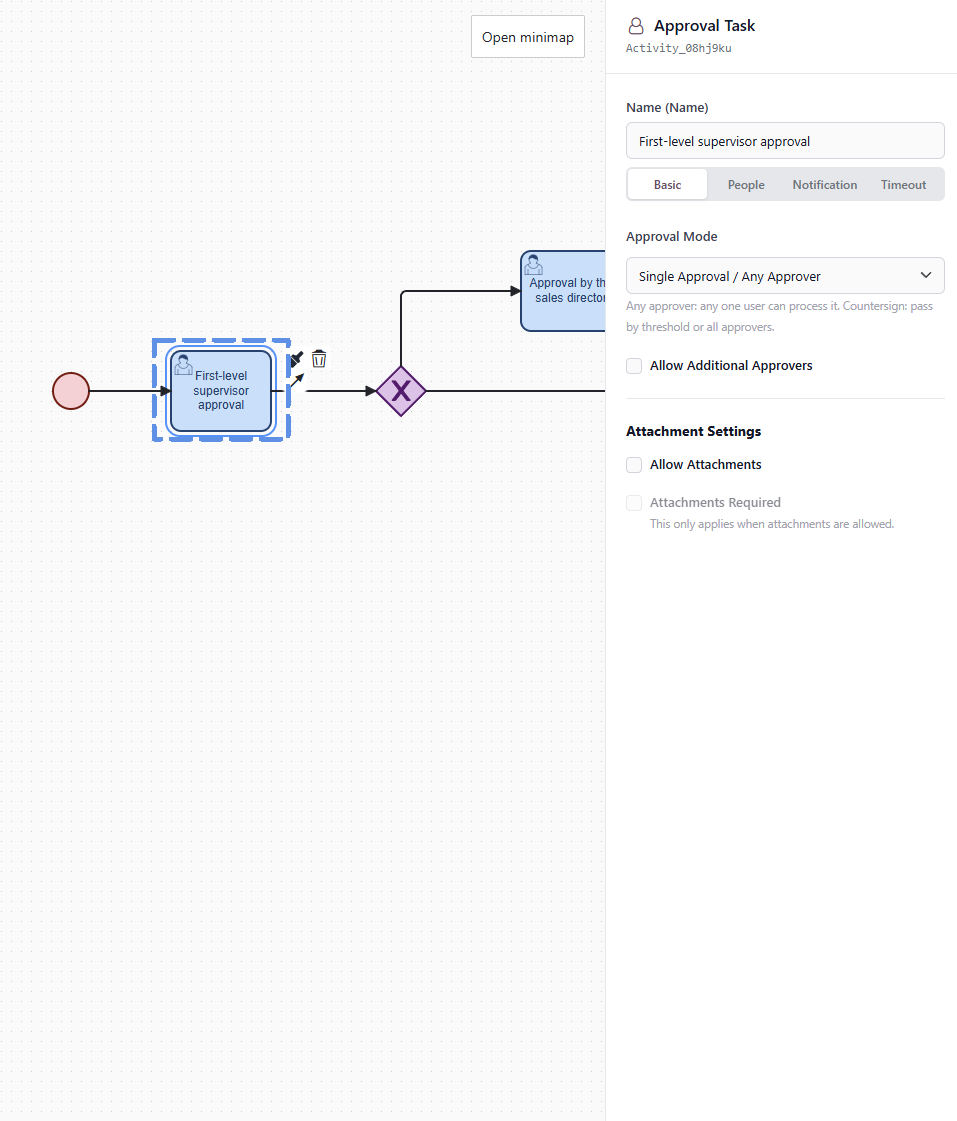
Approval nodes generate approval tasks and define who must approve the current step. A node can use a simple single-approver pattern, where any one assigned approver can move the workflow forward, or a countersignature pattern, where multiple approvers participate and a minimum number of approvals may be required.
This allows MT-Workflow to support both lightweight approval and more formal multi-person review.
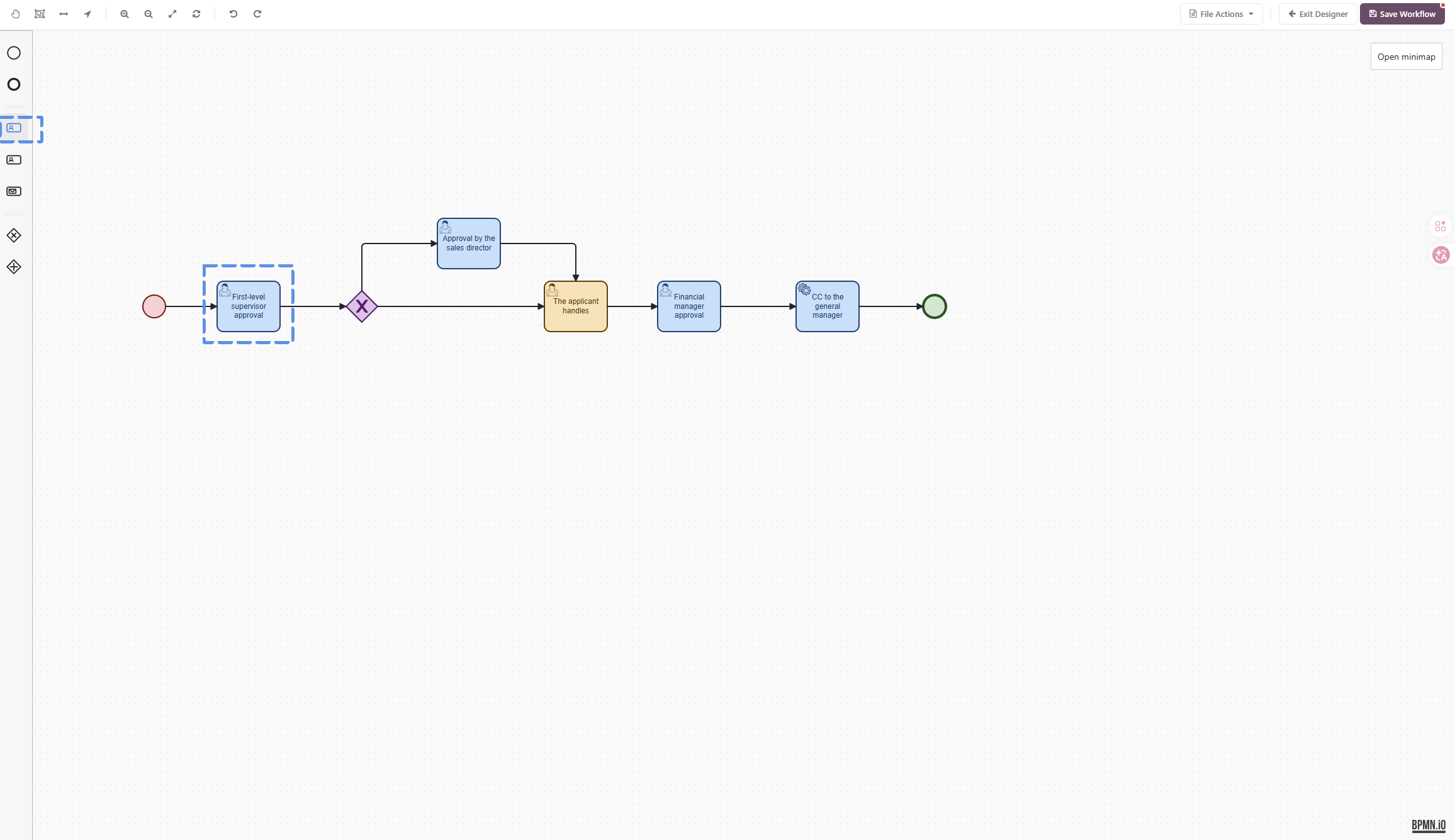
The approval node settings also control whether approvers can add additional approvers and whether attachments are allowed or required. This is useful when the workflow needs supporting documents, payment vouchers, contract files, or extra review from finance, legal, or technical teams.
Handling and CC Nodes
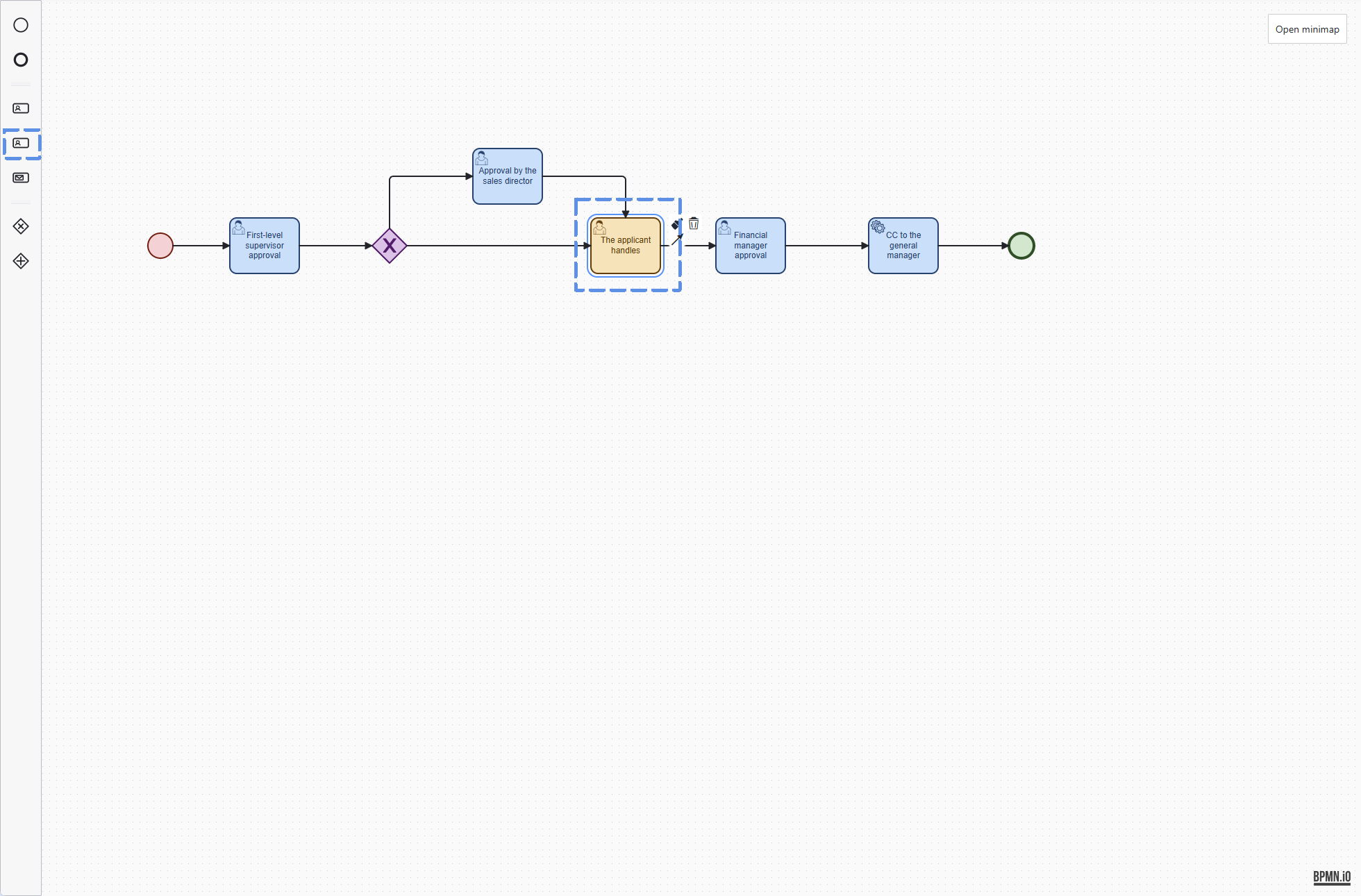
Not every workflow step is an approval decision. Sometimes a person needs to complete work, update information, upload material, or perform an offline check. MT-Workflow handles this through handling nodes.
A handling node can be blocking or non-blocking. A blocking handling task must be completed before the workflow continues. A non-blocking task can run as an auxiliary action without stopping the main approval path.
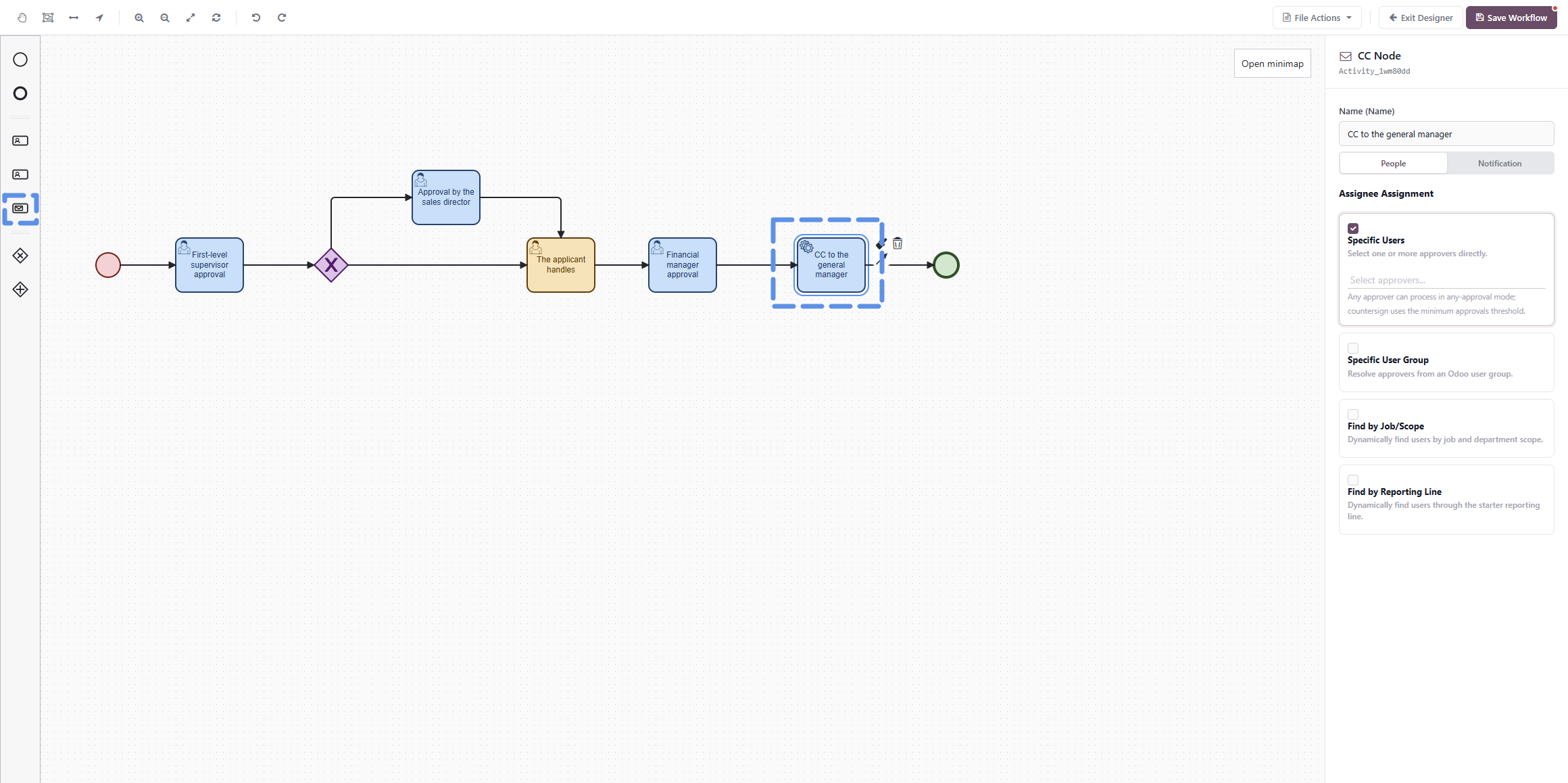
CC nodes are used when people need visibility but do not need to approve or complete a task. They are suitable for management awareness, department synchronization, finance filing, or project team updates.
Branch Logic for Different Business Paths
Business approvals often depend on conditions. A normal order may follow a short path, while a high-value order may require additional finance review. A certain customer type may require sales director review, while other customers follow a standard route.
Exclusive branches are used when only one path should be selected from several possible paths.
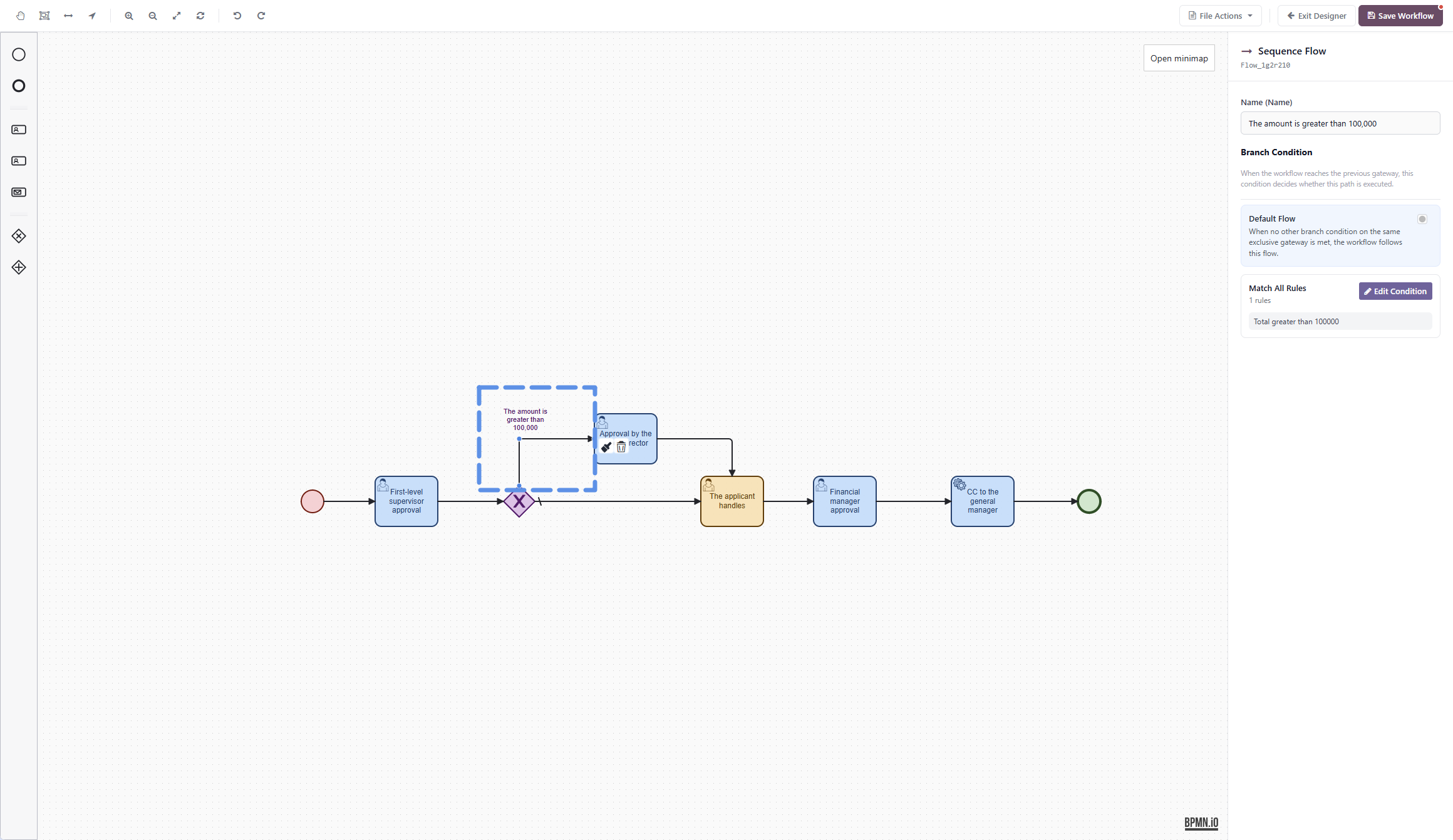
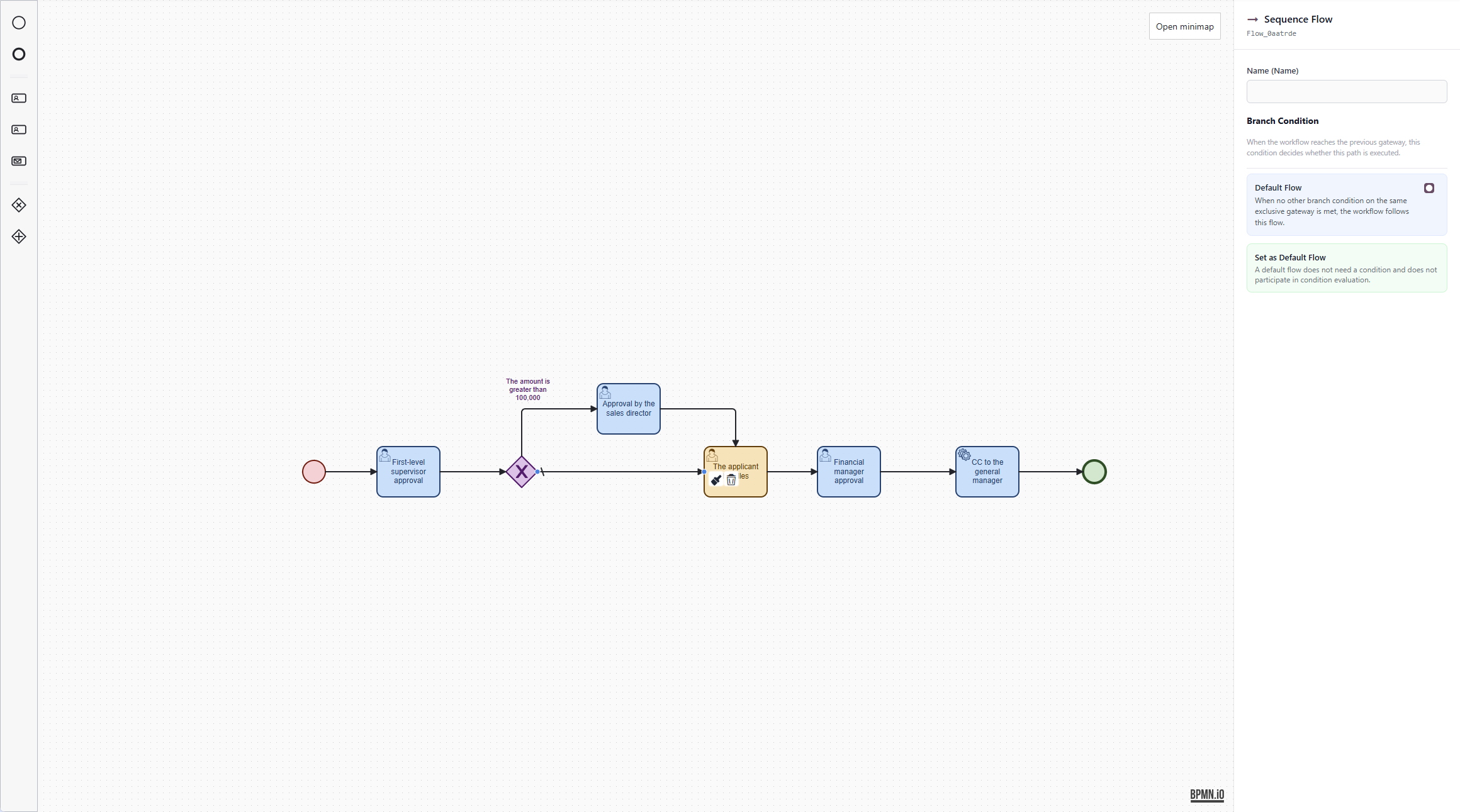
Every exclusive branch should have a default flow. The default flow is the fallback path when no condition matches. This prevents the workflow from reaching a decision point with nowhere to go.
Parallel branches are used when multiple paths need to run at the same time, such as finance and legal review in parallel. Parallel split and join nodes should be designed carefully, because a join waits for every expected path to complete.
Dynamic Assignee Configuration
MT-Workflow can assign tasks through several sources. A workflow can use specific users, Odoo user groups, job positions, department scope, or reporting lines.
This is important for real organizations. Some approvals should always go to fixed users. Some should follow a role, such as finance manager or department head. Others should follow the submitter's management chain.
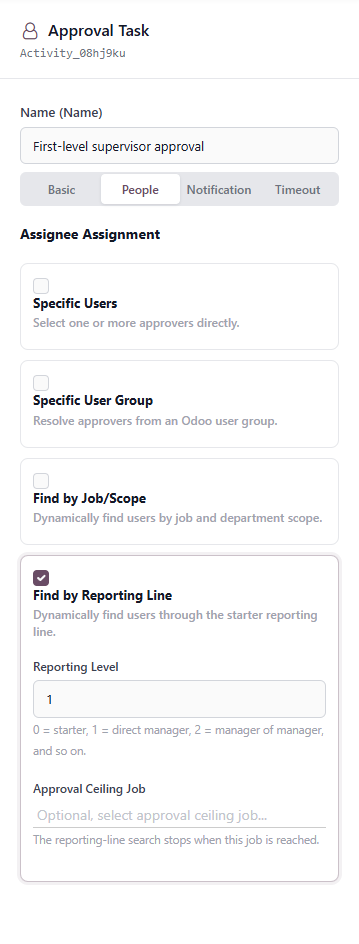
Because assignees can be driven by HR data, the quality of employee, user, department, job position, and manager relationship data matters. Before production rollout, this data should be checked carefully.
Notifications, Reminders, and Timeouts
Approval systems need more than task creation. They also need reminders and escalation behavior when tasks are not handled on time.
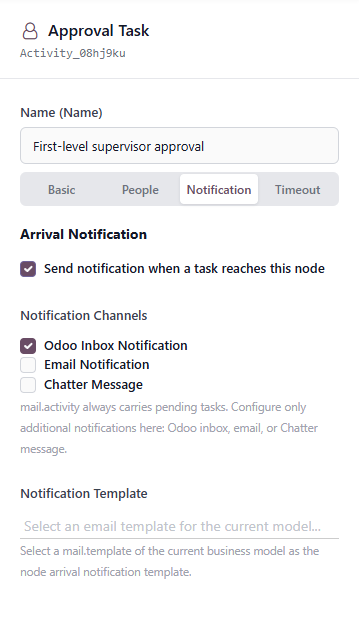
MT-Workflow supports Odoo internal notifications, email notifications, Chatter messages, node arrival notifications, task reminders, repeated reminders, and timeout actions.
Timeout rules can calculate deadlines in minutes, hours, calendar days, or working days. When a task times out, the workflow can record a log, automatically approve, automatically reject, or transfer the task to another person.
For production workflows, automatic approval and automatic rejection should be used carefully. Timeout transfer or log-only behavior is often safer for important business processes.
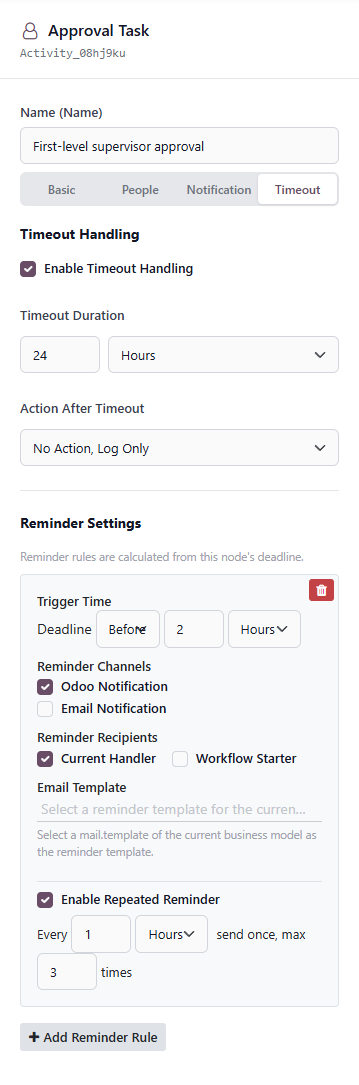
Reminder and timeout processing is handled by Odoo scheduled actions. This means reminder timing depends on cron execution frequency, and a small delay is expected.
User Experience Inside the Business Document
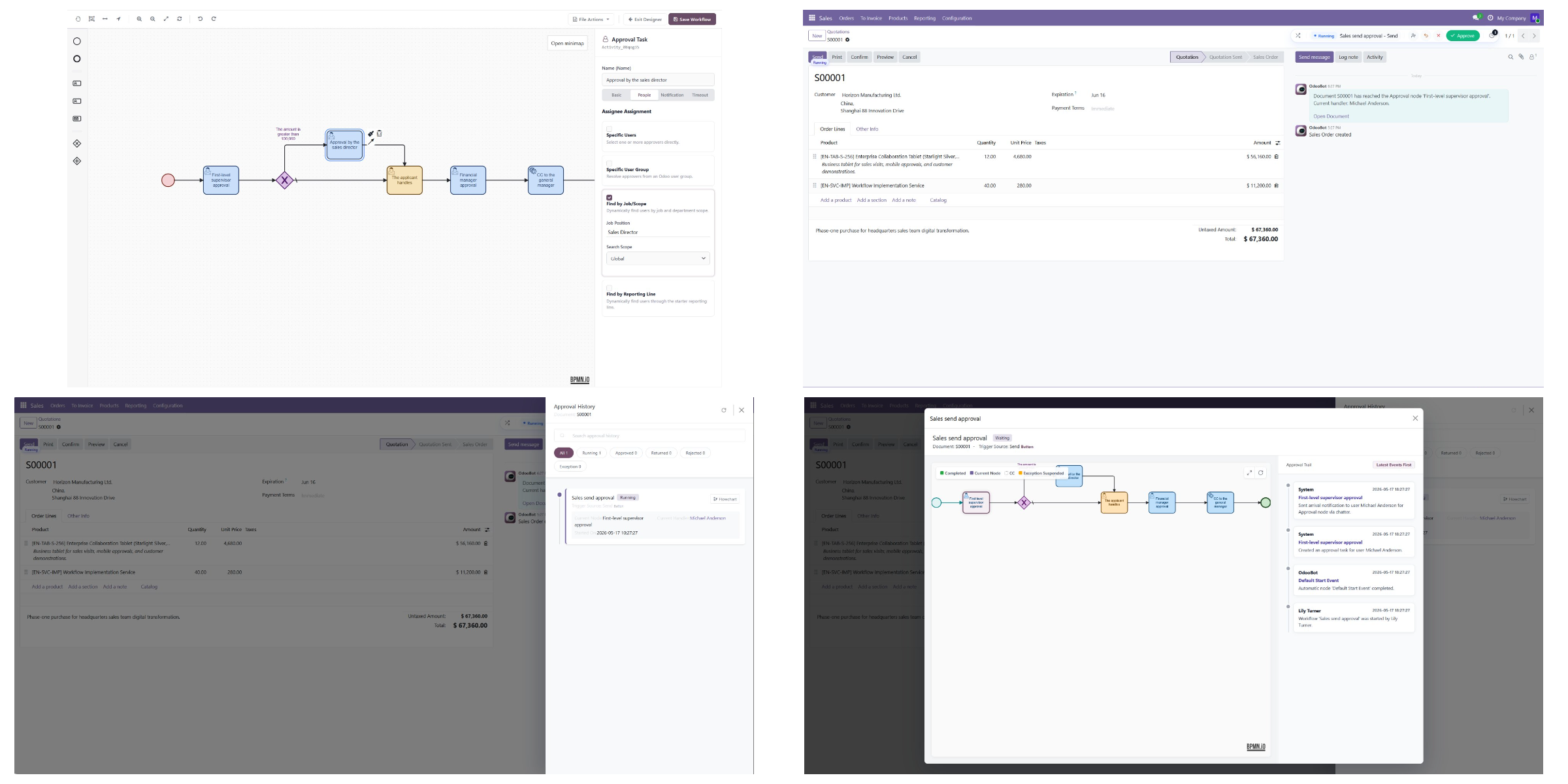
For business users, the workflow entry point remains close to the original document. The workflow action bar displays the workflow status, workflow name, and available actions, so users can handle approval without leaving the business context.

This design keeps approval connected to the document that triggered it. Users can see what is pending, handle the current task, and continue their normal Odoo work from the same place.
Administration and Instance Tracking
After workflows go live, administrators need visibility into running and completed workflow instances. MT-Workflow provides instance management so administrators can review source documents, workflow status, automatic execution status, approval items, handling items, CC items, and logs.

This is important for troubleshooting. If a workflow does not start, an approver does not receive a task, automatic execution fails, or a document becomes locked during approval, administrators need a clear record of what happened.
Batch User Replacement
Organizations change. Employees leave, take long-term leave, move departments, or change roles. If running workflows or workflow definitions still point to old users, approvals may become stuck.
MT-Workflow includes batch user replacement for these situations. It can update pending approval tasks, handling tasks, CC items, instance-level transfer rules, fixed users in workflow definitions, and fixed users saved in running workflow snapshots.
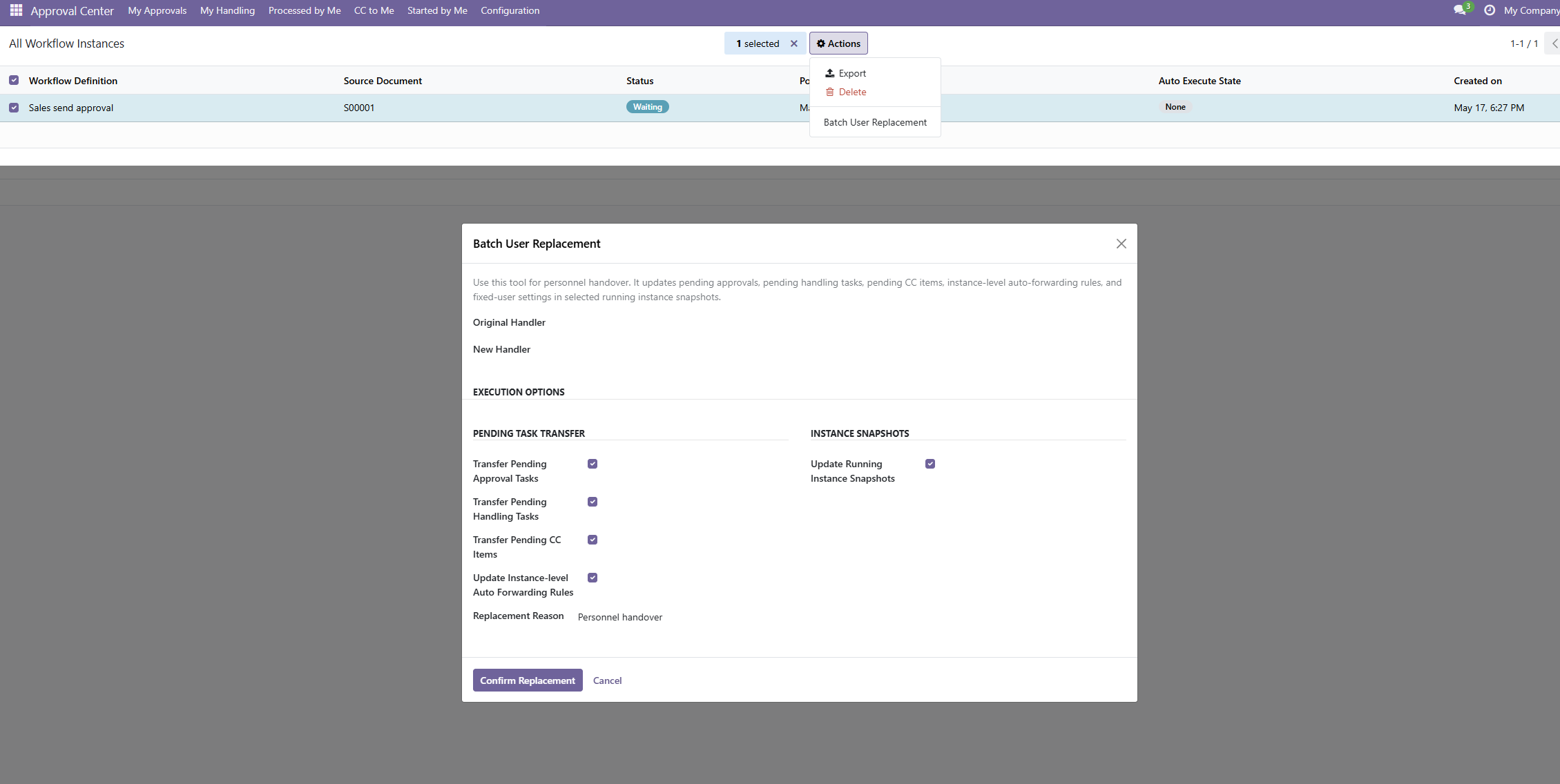
Before running batch replacement, administrators should back up the database, test the change in a non-production environment, and start with a small group of instances.
Where MT-Workflow Fits Best
MT-Workflow is best suited for companies that already use Odoo for real business operations and need approval to control native business actions.
It is especially useful when the approval process requires:
- Binding to native Odoo buttons
- Start conditions based on business data
- Multiple workflow definitions for the same model
- Visual BPMN workflow design
- Approval, handling, and CC tasks
- Countersignature approval and minimum approval counts
- Conditional branches and default flows
- Dynamic assignee rules based on users, groups, positions, or reporting lines
- Notifications, reminders, and timeout handling
- Workflow instance tracking and administrator takeover
- Batch replacement when personnel changes occur
For very simple approval needs, a lightweight rule-based approval module may be enough. But when approval needs to stay close to Odoo business documents and support complex routing, history, reminders, and administration, MT-Workflow provides a more complete workflow control layer.
Conclusion
MT-Workflow turns approval into a configurable, traceable, visual layer inside Odoo. It does not replace Odoo business logic. Instead, it controls when native Odoo actions should run, who must participate before they run, what happens when tasks are delayed, and how the full approval history can be reviewed later.
For teams that want approvals to stay inside Odoo and remain connected to real business documents, MT-Workflow provides a practical way to build advanced approval processes without moving users into a separate approval system.